
Purpose
This document explains how to identify and correct a census discrepancy in the system.
What is a Census Discrepancy?
A census discrepancy is any mismatch, inconsistency, or missing element between:
- Enumerated HL7 messages
- Prior records
- Authoritative registries
Discrepancies can occur due to:
- HL7 message mismatches
- Broker and Performance/Raven DB mismatches
Patient is in Broker, but not in the current Census file
This issue happens when a patient visit is visible in the Broker, but the same visit is not available in the latest census feed.
Steps to Investigate the Issue
Step 1: Log in to the Server
- Log in to the relevant server.
- Check the census feed.
- Verify whether the patient visit is available in the most recent census feed.
Check for A03 Discharge Message
- Verify whether an A03 discharge HL7 message has been received for the visit.
- If an A03 message was received, the patient may have been properly discharged and therefore may not appear in the current census feed.
Confirm if the Visit is Missing from the Recent Census Feed
- If the visit is not available in the recent census feed, confirm this using HL7 History.
- Review the HL7 History to validate:
- Whether the visit was included in previous messages
- Whether a discharge message (A03) was received
- Whether the current census feed is missing the visit
Resolution
If the patient is not present in the census feed, the patient can be removed manually using the appropriate Discharge Visit button in the OPPS portal.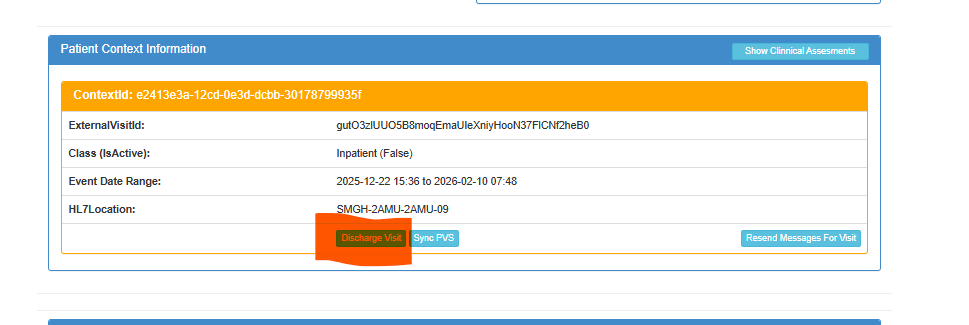
Note:
Before removing the patient, always confirm through:
- Recent census feed review
- HL7 History
- A03 discharge message check
This ensures the patient is not removed incorrectly.